The right tool for the job
Zapier or Make for simple app-to-app steps, n8n when you want it self-hosted or cheaper at volume, and code when a step needs logic the tools can't express.
Services Workflow automation
n8n, Make or Zapier where they fit, custom code where they don't, and AI for the steps that need reading or judgement. Every automation logs what it did and tells you when something fails.
Zapier or Make for simple app-to-app steps, n8n when you want it self-hosted or cheaper at volume, and code when a step needs logic the tools can't express.
A new form entry, email or call record becomes a contact, a task and a reply draft within minutes.
Paid in Stripe, invoiced in QuickBooks, updated in your system, without anyone retyping it.
Claude reads an email or document in the middle of a workflow, pulls out what matters, and hands it to the next step.
Errors go to your email or chat with the record that failed, instead of silently stopping for weeks.
A Zap or scenario that stopped, runs twice or burns through your task quota: I find out why and fix it.
Examples of the kind of request this covers, not quotes from clients.
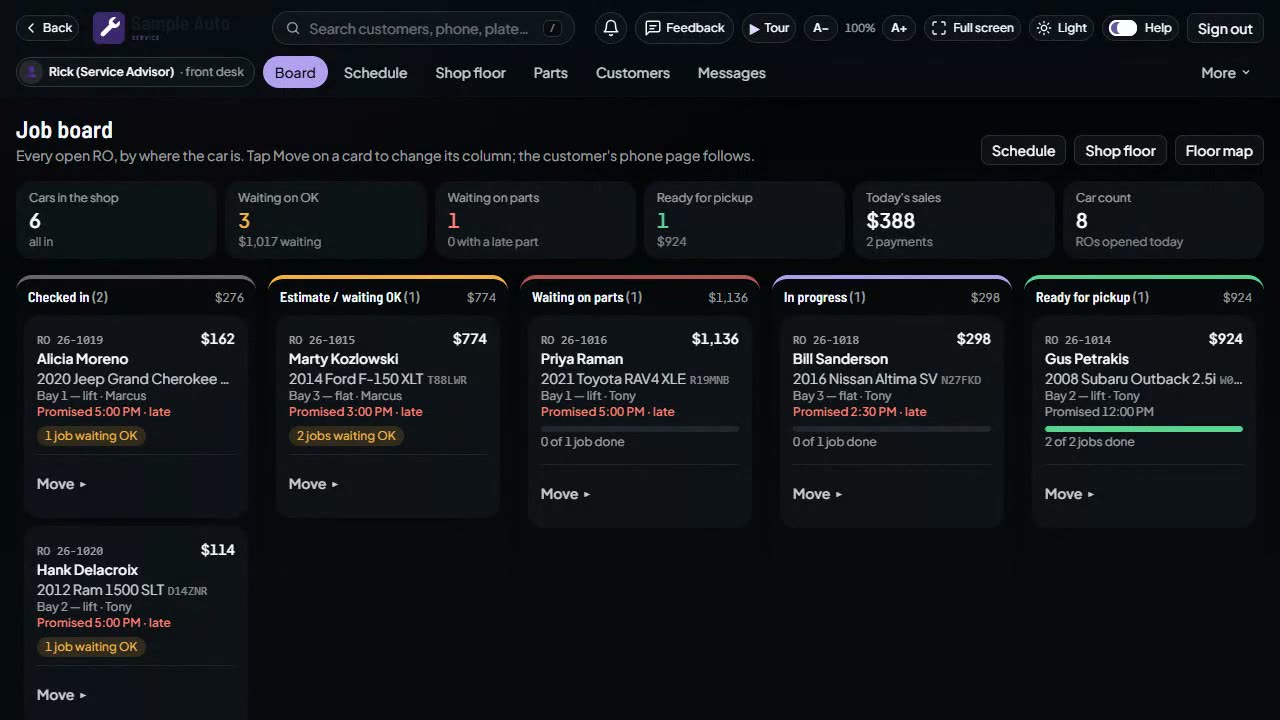
Tessavio Auto sends its own reminders and follow-up texts on schedule and stops when the customer replies. My own business runs on scheduled agents that read email and prepare work for approval.
Automations that scrape websites against their terms, send bulk messages to people who didn't opt in, or run without anyone able to see what they did.
Not for clients yet, and I'll say so plainly. What I have built is the harder part underneath them: the API connections, webhooks and error handling in Tessavio Auto. The first job is small and fixed-price, and on Upwork the payment sits in escrow until you approve it.
Zapier is quickest for simple steps, Make handles branching more cheaply, and n8n can be self-hosted, which is cheaper at high volume. The written plan recommends one and explains why.
You do. They live in your accounts, with a short written description of each one.
I reply in writing with how I’d build it and a fixed price. $55/hour for small fixes; fixed quotes for everything else.
Found me on Upwork? Please message me there: Upwork’s rules keep our conversation on Upwork until a contract starts.
Other services: Custom software · AI integration · Twilio SMS · Google Apps Script · QuickBooks & Stripe